Ryan North, the author of How to Invent Everything, offers a humorous yet practical guide to rebuilding civilization from scratch. If you’re looking to invent things effectively, here are some key principles inspired by his approach:
1. Identify the Problem First
- Great inventions solve real problems. Before inventing, ask:
- What pain point does this address?
- Is there a simpler solution?
- Example: The wheel wasn’t invented until humans needed to move heavy things efficiently.
2. Steal (or Borrow) Ideas
- Most inventions are improvements on existing concepts.
- Example: The printing press combined wine presses (screw mechanism) and movable type (already used in China).
3. Test and Iterate
- Prototype quickly, fail fast, and refine.
- Example: Thomas Edison tested thousands of filament materials before finding the right one for the light bulb.
4. Leverage Interdisciplinary Thinking
- Combine knowledge from different fields.
- Example: GPS required advances in physics (relativity), engineering (satellites), and computing.
5. Document Everything
- Write down failures and successes—this accelerates progress.
- Example: Leonardo da Vinci’s notebooks preserved ideas centuries ahead of their time.
6. Work Within Constraints
- Scarcity fuels creativity.
- Example: The Apollo program achieved the moon landing with 1960s computing power.
7. Consider Unintended Consequences
- Every invention has side effects (e.g., social media → misinformation).
- Ask: How could this be misused?
8. Make It Scalable
- Can your invention be mass-produced or widely adopted?
- Example: The steam engine became revolutionary only when standardized.
9. Collaborate
- Innovation thrives in networks. Share ideas and build on others’ work.
- Example: Open-source software (Linux, Wikipedia) relies on collaboration.
10. Have Fun
- Playfulness leads to breakthroughs (e.g., Post-it Notes came from a failed adhesive experiment).
For more, check out How to Invent Everything: A Survival Guide for the Stranded Time Traveler—it’s a hilarious deep dive into the fundamentals of civilization’s greatest inventions!
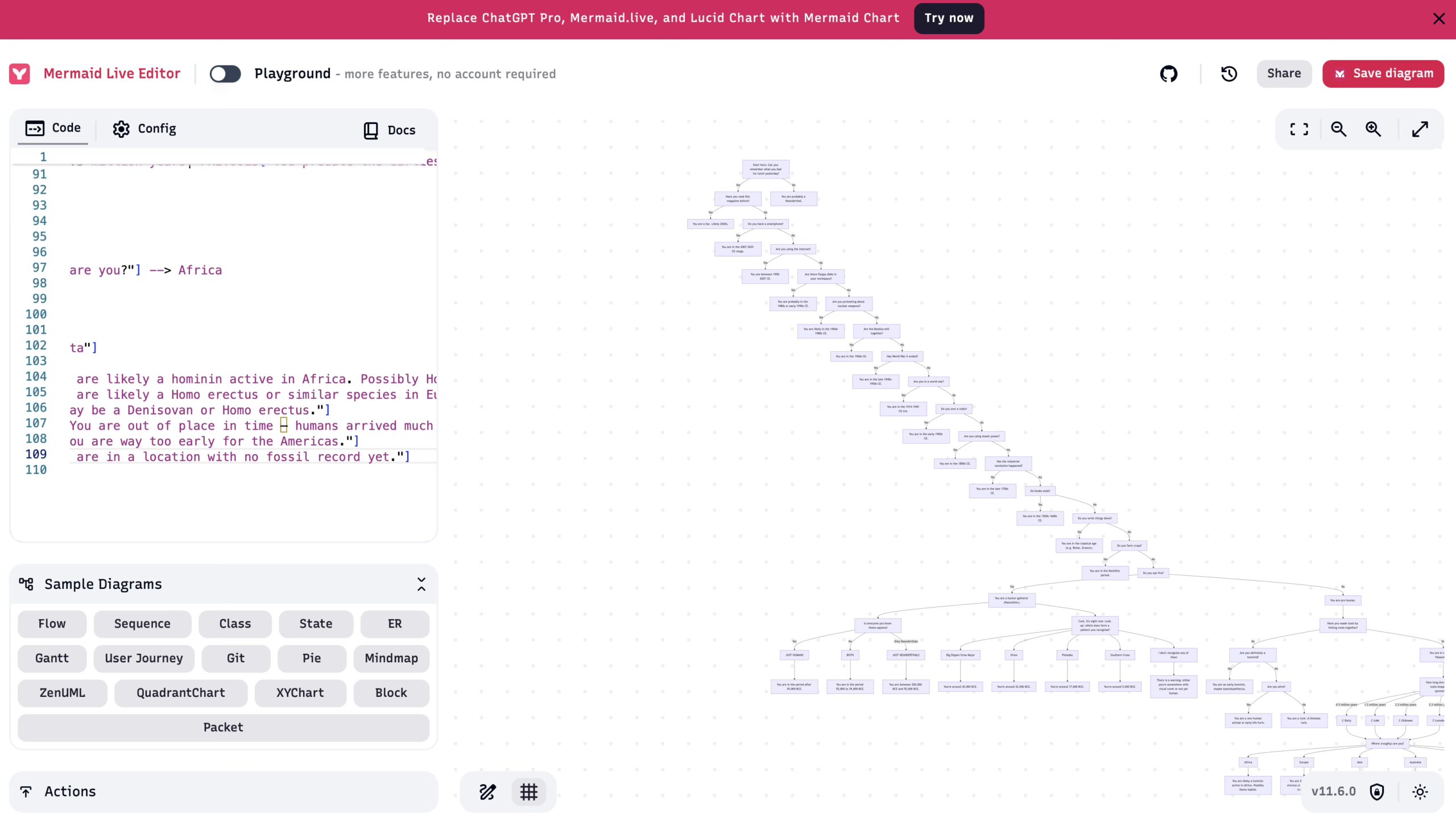
graph TD

    %% ENTRY POINT
    Start["Start here: Can you remember what you had for lunch yesterday?"]
    Start -->|Yes| RDG1["Have you read this magazine before?"]
    Start -->|No| MC1["You are probably a Neanderthal."]

    RDG1 -->|Yes| FAN1["You are a fan. Likely 2020s."]
    RDG1 -->|No| SMRT1["Do you have a smartphone?"]

    SMRT1 -->|Yes| TIME1["You are in the 2007–2025 CE range."]
    SMRT1 -->|No| INT1["Are you using the internet?"]

    INT1 -->|Yes| TIME2["You are between 1990–2007 CE."]
    INT1 -->|No| TECH1["Are there floppy disks in your workspace?"]

    TECH1 -->|Yes| TIME3["You are probably in the 1980s or early 1990s CE."]
    TECH1 -->|No| PROTEST1["Are you protesting about nuclear weapons?"]

    PROTEST1 -->|Yes| TIME4["You are likely in the 1960s–1980s CE."]
    PROTEST1 -->|No| BEATLE1["Are the Beatles still together?"]

    BEATLE1 -->|Yes| TIME5["You are in the 1960s CE."]
    BEATLE1 -->|No| WW2["Has World War II ended?"]

    WW2 -->|Yes| TIME6["You are in the late 1940s–1950s CE."]
    WW2 -->|No| WAR1["Are you in a world war?"]

    WAR1 -->|Yes| TIME7["You are in the 1914–1945 CE era."]
    WAR1 -->|No| RADIO1["Do you own a radio?"]

    RADIO1 -->|Yes| TIME8["You are in the early 1900s CE."]
    RADIO1 -->|No| STEAM1["Are you using steam power?"]

    STEAM1 -->|Yes| TIME9["You are in the 1800s CE."]
    STEAM1 -->|No| IND1["Has the industrial revolution happened?"]

    IND1 -->|Yes| TIME10["You are in the late 1700s CE."]
    IND1 -->|No| PRINT1["Do books exist?"]

    PRINT1 -->|Yes| TIME11["You are in the 1500s–1600s CE."]
    PRINT1 -->|No| WRITING1["Do you write things down?"]

    WRITING1 -->|Yes| TIME12["You are in the classical age (e.g. Rome, Greece)."]
    WRITING1 -->|No| AGRI1["Do you farm crops?"]

    AGRI1 -->|Yes| TIME13["You are in the Neolithic period."]
    AGRI1 -->|No| FIRE1["Do you use fire?"]

    FIRE1 -->|Yes| TIME14["You are a hunter-gatherer (Paleolithic)."]
    FIRE1 -->|No| TIME15["You are pre-human."]

    %% EARLY HUMAN BRANCH (Right Page)

    TIME14 --> NEAND1["Is everyone you know Homo sapiens?"]
    NEAND1 -->|Yes| JUSTHUMANS["JUST HUMANS"]
    NEAND1 -->|No| BOTH["BOTH"]
    NEAND1 -->|Only Neanderthals| JUSTNEANDS["JUST NEANDERTHALS"]

    JUSTHUMANS --> HSAPIENS1["You are in the period after 39,000 BCE."]
    BOTH --> HSAPIENS2["You are in the period 55,000 to 39,000 BCE."]
    JUSTNEANDS --> NEANDONLY["You are between 200,000 BCE and 55,000 BCE."]

    %% Constellation flow
    TIME14 --> CONST1["Cool, it's night now. Look up: which stars form a pattern you recognise?"]

    CONST1 --> URSA["Big Dipper/Ursa Major"] --> CONSTDATE1["You're around 30,000 BCE."]
    CONST1 --> ORION["Orion"] --> CONSTDATE2["You're around 32,000 BCE."]
    CONST1 --> PLEIADES["Pleiades"] --> CONSTDATE3["You're around 17,000 BCE."]
    CONST1 --> CROSS["Southern Cross"] --> CONSTDATE4["You're around 5,000 BCE."]
    CONST1 --> DONTR["I don't recognise any of them"] --> CONSTCHECK["There is a warning: either you're somewhere with cloud cover or not yet human."]

    %% EARLIER THAN FIRE
    TIME15 --> TOOLS1["Have you made tools by hitting rocks together?"]
    TOOLS1 -->|Yes| STONE1["You are in the Lower Palaeolithic."]
    TOOLS1 -->|No| HOMINID1["Are you definitely a hominid?"]

    HOMINID1 -->|Yes| STONE2["You are an early hominin, maybe Australopithecus."]
    HOMINID1 -->|No| LIFE1["Are you alive?"]

    LIFE1 -->|Yes| EVOLVE1["You are a non-human animal or early life form."]
    LIFE1 -->|No| NONLIVING["You are a rock. A timeless rock."]

    STONE1 --> TOOLTYPE["How long since your stone tools stopped being symmetrical?"]

    TOOLTYPE -->|0.5 million years| C_EARLY["C-Early"]
    TOOLTYPE -->|1.2 million years| C_LAM["C-LAM"]
    TOOLTYPE -->|2.3 million years| C_Oldowan["C-Oldowan"]
    TOOLTYPE -->|3.3 million years| C_Lomekwi["C-Lomekwi"]
    TOOLTYPE -->|More than 3.3 million years| PRETOOLS["You predate the earliest known tools. You're pre-technological."]

    C_EARLY --> GEOLOC
    C_LAM --> GEOLOC
    C_Oldowan --> GEOLOC
    C_Lomekwi --> GEOLOC

    GEOLOC["Where (roughly) are you?"] --> Africa
    GEOLOC --> Europe
    GEOLOC --> Asia
    GEOLOC --> Australia
    GEOLOC --> Americas
    GEOLOC --> NoData["No data"]

    Africa --> CONTEXT1["You are likely a hominin active in Africa. Possibly Homo habilis."]
    Europe --> CONTEXT2["You are likely a Homo erectus or similar species in Europe."]
    Asia --> CONTEXT3["You may be a Denisovan or Homo erectus."]
    Australia --> CONTEXT4["You are out of place in time – humans arrived much later."]
    Americas --> CONTEXT5["You are way too early for the Americas."]
    NoData --> CONTEXT6["You are in a location with no fossil record yet."]
output as svg:graph TD
%% ENTRY POINT
Start["Start here: Can you remember what you had for lunch yesterday?"]
Start -->|Yes| RDG1["Have you read this magazine before?"]
Start -->|No| MC1["You are probably a Neanderthal."]

RDG1 -->|Yes| FAN1["You are a fan. Likely 2020s."]
RDG1 -->|No| SMRT1["Do you have a smartphone?"]

SMRT1 -->|Yes| TIME1["You are in the 2007–2025 CE range."]
SMRT1 -->|No| INT1["Are you using the internet?"]

INT1 -->|Yes| TIME2["You are between 1990–2007 CE."]
INT1 -->|No| TECH1["Are there floppy disks in your workspace?"]

TECH1 -->|Yes| TIME3["You are probably in the 1980s or early 1990s CE."]
TECH1 -->|No| PROTEST1["Are you protesting about nuclear weapons?"]

PROTEST1 -->|Yes| TIME4["You are likely in the 1960s–1980s CE."]
PROTEST1 -->|No| BEATLE1["Are the Beatles still together?"]

BEATLE1 -->|Yes| TIME5["You are in the 1960s CE."]
BEATLE1 -->|No| WW2["Has World War II ended?"]

WW2 -->|Yes| TIME6["You are in the late 1940s–1950s CE."]
WW2 -->|No| WAR1["Are you in a world war?"]

WAR1 -->|Yes| TIME7["You are in the 1914–1945 CE era."]
WAR1 -->|No| RADIO1["Do you own a radio?"]

RADIO1 -->|Yes| TIME8["You are in the early 1900s CE."]
RADIO1 -->|No| STEAM1["Are you using steam power?"]

STEAM1 -->|Yes| TIME9["You are in the 1800s CE."]
STEAM1 -->|No| IND1["Has the industrial revolution happened?"]

IND1 -->|Yes| TIME10["You are in the late 1700s CE."]
IND1 -->|No| PRINT1["Do books exist?"]

PRINT1 -->|Yes| TIME11["You are in the 1500s–1600s CE."]
PRINT1 -->|No| WRITING1["Do you write things down?"]

WRITING1 -->|Yes| TIME12["You are in the classical age (e.g. Rome, Greece)."]
WRITING1 -->|No| AGRI1["Do you farm crops?"]

AGRI1 -->|Yes| TIME13["You are in the Neolithic period."]
AGRI1 -->|No| FIRE1["Do you use fire?"]

FIRE1 -->|Yes| TIME14["You are a hunter-gatherer (Paleolithic)."]
FIRE1 -->|No| TIME15["You are pre-human."]

%% EARLY HUMAN BRANCH (Right Page)

TIME14 --> NEAND1["Is everyone you know Homo sapiens?"]
NEAND1 -->|Yes| JUSTHUMANS["JUST HUMANS"]
NEAND1 -->|No| BOTH["BOTH"]
NEAND1 -->|Only Neanderthals| JUSTNEANDS["JUST NEANDERTHALS"]

JUSTHUMANS --> HSAPIENS1["You are in the period after 39,000 BCE."]
BOTH --> HSAPIENS2["You are in the period 55,000 to 39,000 BCE."]
JUSTNEANDS --> NEANDONLY["You are between 200,000 BCE and 55,000 BCE."]

%% Constellation flow
TIME14 --> CONST1["Cool, it's night now. Look up: which stars form a pattern you recognise?"]

CONST1 --> URSA["Big Dipper/Ursa Major"] --> CONSTDATE1["You're around 30,000 BCE."]
CONST1 --> ORION["Orion"] --> CONSTDATE2["You're around 32,000 BCE."]
CONST1 --> PLEIADES["Pleiades"] --> CONSTDATE3["You're around 17,000 BCE."]
CONST1 --> CROSS["Southern Cross"] --> CONSTDATE4["You're around 5,000 BCE."]
CONST1 --> DONTR["I don't recognise any of them"] --> CONSTCHECK["There is a warning: either you're somewhere with cloud cover or not yet human."]

%% EARLIER THAN FIRE
TIME15 --> TOOLS1["Have you made tools by hitting rocks together?"]
TOOLS1 -->|Yes| STONE1["You are in the Lower Palaeolithic."]
TOOLS1 -->|No| HOMINID1["Are you definitely a hominid?"]

HOMINID1 -->|Yes| STONE2["You are an early hominin, maybe Australopithecus."]
HOMINID1 -->|No| LIFE1["Are you alive?"]

LIFE1 -->|Yes| EVOLVE1["You are a non-human animal or early life form."]
LIFE1 -->|No| NONLIVING["You are a rock. A timeless rock."]

STONE1 --> TOOLTYPE["How long since your stone tools stopped being symmetrical?"]

TOOLTYPE -->|0.5 million years| C_EARLY["C-Early"]
TOOLTYPE -->|1.2 million years| C_LAM["C-LAM"]
TOOLTYPE -->|2.3 million years| C_Oldowan["C-Oldowan"]
TOOLTYPE -->|3.3 million years| C_Lomekwi["C-Lomekwi"]
TOOLTYPE -->|More than 3.3 million years| PRETOOLS["You predate the earliest known tools. You're pre-technological."]

C_EARLY --> GEOLOC
C_LAM --> GEOLOC
C_Oldowan --> GEOLOC
C_Lomekwi --> GEOLOC

GEOLOC["Where (roughly) are you?"] --> Africa
GEOLOC --> Europe
GEOLOC --> Asia
GEOLOC --> Australia
GEOLOC --> Americas
GEOLOC --> NoData["No data"]

Africa --> CONTEXT1["You are likely a hominin active in Africa. Possibly Homo habilis."]
Europe --> CONTEXT2["You are likely a Homo erectus or similar species in Europe."]
Asia --> CONTEXT3["You may be a Denisovan or Homo erectus."]
Australia --> CONTEXT4["You are out of place in time – humans arrived much later."]
Americas --> CONTEXT5["You are way too early for the Americas."]
NoData --> CONTEXT6["You are in a location with no fossil record yet."]
Start here: Can you remember what you had for lunch yesterday?
Have you read this magazine before?
You are probably a Neanderthal.
You are a fan. Likely 2020s.
Do you have a smartphone?
For creating complex flowcharts like yours, here are the best tools to generate them as SVG:
1. Mermaid.js (Best for Code-Based Flowcharts)
Your diagram is already written in Mermaid syntax—this is the easiest way to generate an SVG automatically.
How to use:
- Online Editor:
- Go to Mermaid Live Editor
- Paste your code
- Export as SVG
- Programmatically (Node.js):
   npm install @mermaid-js/mermaid-cli
   mmdc -i flowchart.mmd -o flowchart.svg
2. Graphviz (For Advanced Layout Control)
If you need precise control over node positioning, use DOT language (Graphviz).
Example DOT code:
digraph G {
  "Start" -> "RDG1" [label="Yes"]
  "Start" -> "MC1" [label="No"]
  "RDG1" -> "FAN1" [label="Yes"]
  "RDG1" -> "SMRT1" [label="No"]
  // ... rest of your flow
}
Convert to SVG:
dot -Tsvg flowchart.dot -o flowchart.svg3. Draw.io (Free & Interactive)
- Best for manual tweaking
- Supports Mermaid import (newer versions)
- Export directly to SVG
4. Inkscape (Manual SVG Editing)
If you need to edit the SVG afterward, use Inkscape (free/open-source).
Recommendation:
- Use Mermaid (since your chart is already in Mermaid syntax).
- If layout issues arise, try Graphviz for more control.
- For manual adjustments, Draw.io or Inkscape.
Would you like me to generate the full SVG for you using one of these methods?
Leave a Reply
You must be logged in to post a comment.