Intro: When Good Tools Go Bad
Let’s get one thing straight: Trello is a brilliant product. Its Kanban-style boards are intuitive, collaborative, and downright addictive for productivity nerds. But Atlassian, the company behind Trello, seems hell-bent on ruining the experience with a user authentication system so convoluted, it feels like navigating a labyrinth designed by a sadistic IT manager. Let’s rant about the three-headed monster of Trello’s login UX.
1. The Domain Account Madness: “Who Am I Today?”
Imagine this: You use Trello for work (yourcompany.atlassian.net) and personal (trello.com). But wait—these are treated as entirely separate universes. Your work email? Personal email? Magic 8-ball? Good luck remembering which one you used to sign up where.
- “Why can’t I access my boards?!”
You’ll frantically toggle between domains, guessing which email or username you registered with, only to be greeted by the soul-crushing “Account not found” error. - Zero unification: Atlassian acts shocked that someone might exist in both professional and personal realms. The result? Two accounts, two passwords, two identity crises before 9 AM.
2. Login Option Overload: A Buffet Nobody Ordered
Trello’s login screen looks like a tech conference sponsorship list: Google, Apple, Microsoft, Slack, “Continue with SSO”, “Use your Atlassian account”, and—oh look!—a humble email/password option buried at the bottom.
- Decision paralysis: Did you use “Sign in with Apple” last time? Or was it Google? Or did you accidentally create a standalone Atlassian account (whatever that is)?
- UI clutter: The buttons are so crammed, you’ll need a magnifying glass to find the right one. Spoiler: You’ll still pick wrong, triggering a password reset loop.
3. The Apple Passkey Debacle: Security? Just Write It Down!™
Atlassian proudly claims Passkey support. But wait! It’s not Apple’s Passkey. No, no—they’ve invented their own 24-digit “Passkey” (read: glorified backup code).
- “Write this down. On paper. Seriously.”
In 2024, when Apple and Google push passwordless futures, Atlassian asks you to scribble a 24-digit code on a sticky note. Lose it? Hope you enjoy account recovery purgatory. - False advertising: Calling it a “Passkey” is like selling a bicycle and handing over a unicycle. It’s not the same, and everyone’s annoyed.
Conclusion: Atlassian, Fix This Mess
Trello’s core product is too good to be dragged down by Stone Age authentication. Atlassian, here’s your to-do list:
- Unify accounts across domains.
- Simplify login options (or at least remember my choice).
- Support real Passkeys, not paper-based parodies.
Until then, I’ll be organizing my life with Post-it notes. At least they don’t require a 24-digit code.
Rant over. Happy collaborating? 🔑💢
TL;DR: Trello’s UX for logins is a dumpster fire of fragmented accounts, option overload, and faux-security. Atlassian, we deserve better.
[Comments section: Open for commiseration.]
Update: the nightmare never ends
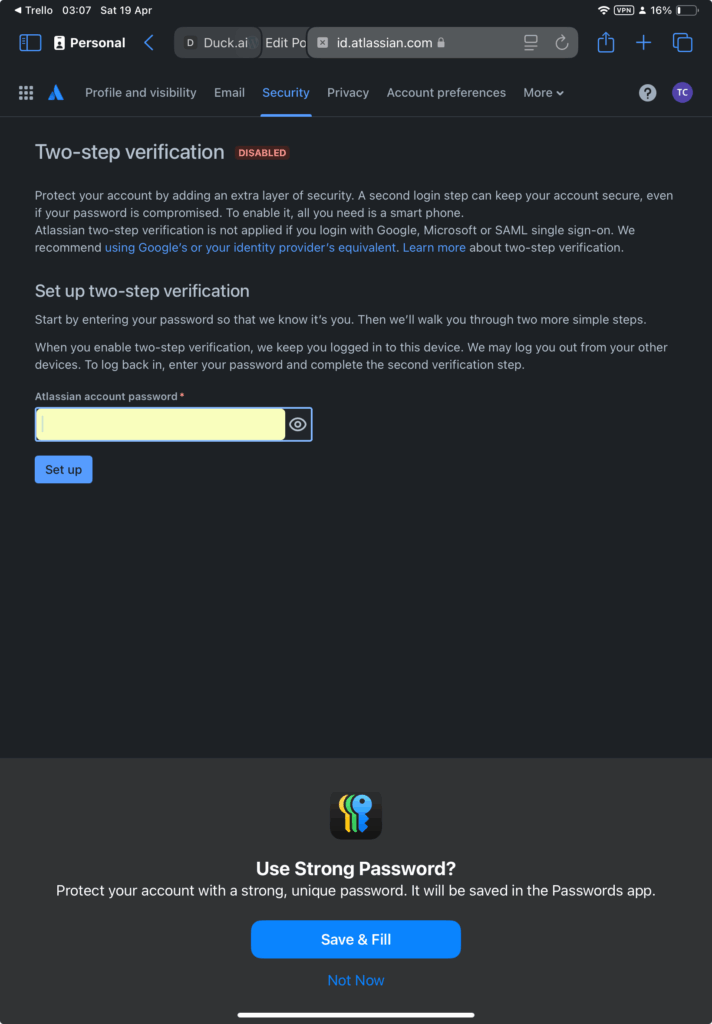
I assume Trello developers never use Mac or iPhone as the passkey is never requested and after attempting to enable 2 step verification you get asked to set a new password:
Leave a Reply
You must be logged in to post a comment.